When choosing a digital microscope camera, one specification often attracts more attention than almost any other:
1080p or 4K?
At first glance, the answer seems obvious.
4K has four times as many display pixels as 1080p, so a 4K microscope camera must produce four times as much microscopic detail.
But microscopy does not work quite that way.
A higher-resolution camera can certainly produce a sharper and more detailed digital image — but only when the microscope optics, sensor, adapter, display, illumination, and specimen can actually provide useful information at that resolution.
In some applications, 4K is a major practical upgrade.
In others, a good 1080p camera running at a higher frame rate may provide a better working experience.
The real question is therefore not:
“Is 4K better than 1080p?”
It is:
“Which combination of resolution, frame rate, optical performance, and workflow is best for my microscopy application?”
This guide explains the difference.
What Does 1080p Mean?
1080p, also called Full HD, typically refers to an image resolution of:
1920 × 1080 pixels
That equals approximately:
2.07 million pixels
A 1080p microscope camera can therefore output an image containing just over two million pixels per frame.
For many microscopy applications, this remains more than adequate.
Typical uses include:
PCB inspection
Microsoldering
Biological observation
Classroom demonstrations
Routine industrial inspection
Jewelry inspection
Live microscope viewing
General documentation
One major advantage of 1080p is that lower-resolution frames contain less data.
This often allows cameras to achieve higher frame rates and lower processing requirements.
What Does 4K Mean?
For most HDMI microscope cameras, 4K refers to 4K UHD:
3840 × 2160 pixels
That equals approximately:
8.29 million pixels
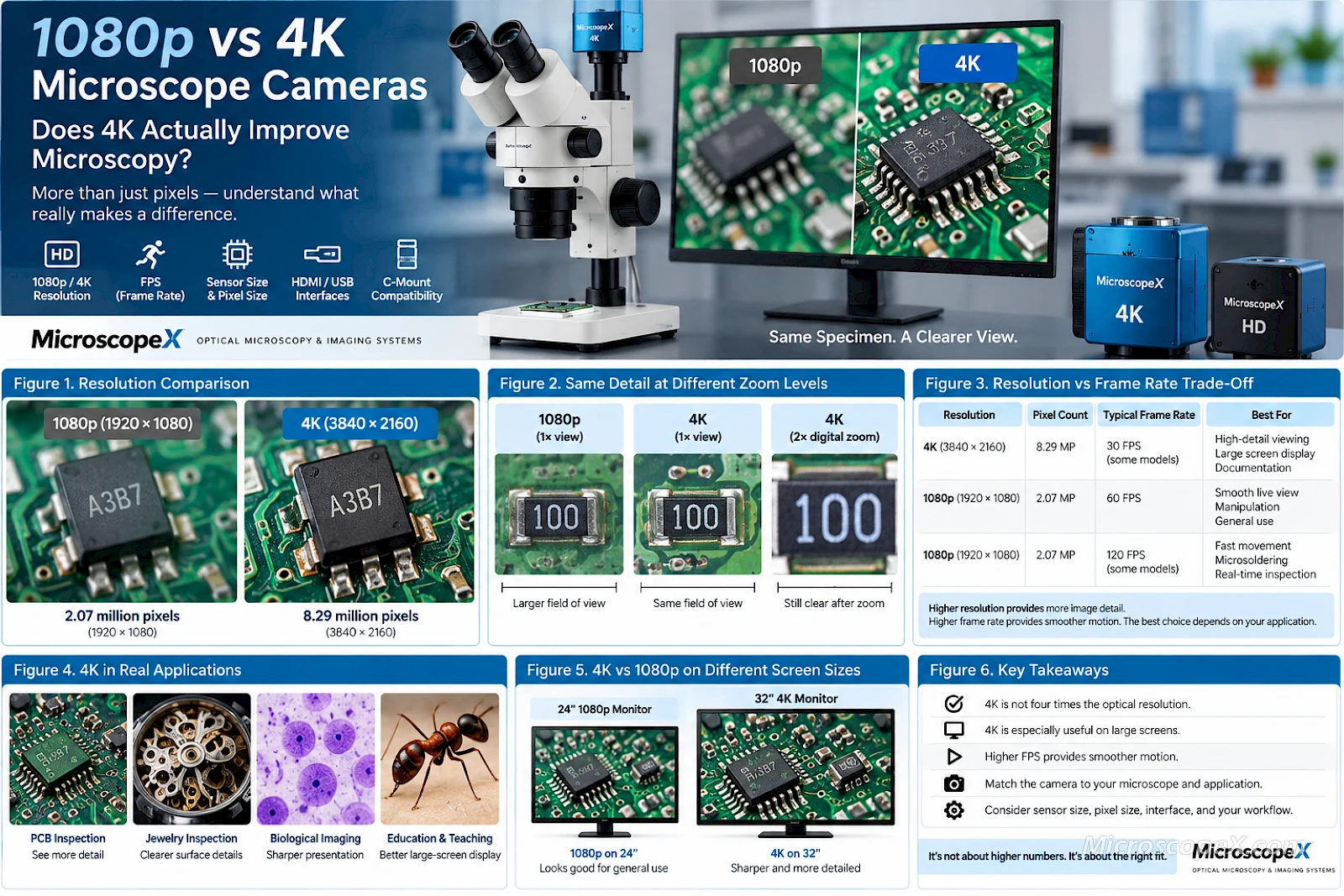
A 4K image therefore contains four times as many pixels as a 1080p image.
The comparison is:
| Resolution | Pixel Dimensions | Approx. Pixels |
|---|---|---|
| 1080p | 1920 × 1080 | 2.07 MP |
| 4K UHD | 3840 × 2160 | 8.29 MP |
Because both horizontal and vertical resolution are doubled, the total pixel count increases by approximately four times.
This can produce a visibly sharper image on a 4K display.
But those additional pixels only improve useful microscopic detail when the rest of the imaging system supports them.
Does 4K Give Four Times More Microscopic Detail?
Not necessarily.
This is one of the most important concepts in digital microscopy.
A microscope camera does not create optical detail.
It samples an image that has already been created by the microscope optics.
The complete imaging chain is:
Specimen → Illumination → Objective → Microscope Optics → Camera Adapter → Sensor → Image Processing → Display
If the optical system cannot resolve additional specimen detail, increasing camera resolution cannot recover information that never reached the sensor.
This means:
More camera pixels do not automatically equal more optical resolution.
Optical Resolution vs Digital Resolution
To understand when 4K helps, it is important to separate two concepts.
Optical Resolution
Optical resolution describes how closely two specimen details can be positioned while still being distinguished as separate structures.
It depends heavily on:
Objective numerical aperture
Illumination wavelength
Optical quality
Contrast
Microscope configuration
Specimen preparation
Digital Resolution
Digital resolution describes how densely the optical image is sampled by the camera sensor.
It depends on:
Sensor pixel count
Pixel size
Sensor dimensions
Optical magnification
Camera adapter magnification
The camera needs enough pixels to adequately sample the microscope image.
If there are too few pixels, fine optical details may be lost.
But once the optical information is sufficiently sampled, adding significantly more pixels produces diminishing returns.
Understanding Image Sampling
Imagine that your microscope can resolve a fine line pattern.
If the camera has too few pixels to sample that pattern properly, some detail may disappear or become distorted.
Increasing the camera resolution can help.
But imagine instead that the microscope optics already blur two extremely close lines into one.
Increasing camera resolution from 1080p to 4K will simply record that same blurred feature using more pixels.
You get:
More pixels describing the same optical information.
This is why matching the camera to the microscope is more important than choosing the largest resolution number.
When 4K Really Does Improve the Image
There are many situations where the additional pixels of 4K are genuinely useful.
1. Large-Screen Viewing
One of the clearest advantages appears when microscope images are displayed on a large 4K monitor.
A 1080p image displayed fullscreen on a 4K screen must be scaled to fill approximately four times as many screen pixels.
A native 4K output can instead map much more closely to the display's native resolution.
The result can be:
Sharper edges
Finer textural detail
Better-looking component boundaries
Cleaner digital overlays
More comfortable large-screen inspection
This is particularly useful for industrial microscopy.
2. PCB and Electronics Inspection
Electronics inspection is one of the strongest use cases for 4K microscope cameras.
Printed circuit boards contain large numbers of small, sharply defined structures such as:
Solder joints
IC pins
PCB traces
Pads
Vias
Connectors
Fine-pitch components
Surface contamination
Component markings
A 4K camera can display more visual information simultaneously, particularly when paired with a high-quality stereo or video microscope.
This can make it easier to inspect a larger area without relying as heavily on digital zoom.
3. Jewelry and Gemstone Inspection
Jewelry and gemstones contain fine surface details that benefit from high-resolution display.
Examples include:
Surface scratches
Engravings
Facet edges
Inclusions
Setting details
Surface defects
On a large display, 4K can make these features easier to evaluate and demonstrate.
This is especially useful when the microscope image also needs to be shown to a customer, student, or colleague.
4. Teaching and Demonstration
A microscope connected to a large 4K display can be an effective teaching system.
4K provides more display pixels for:
Cells
Tissue structures
Insects
Minerals
Circuit boards
Metallurgical samples
It can also improve the appearance of:
Labels
Measurement overlays
Annotations
Menus
Side-by-side comparisons
For classrooms and presentation environments, image clarity can matter even when the additional pixels do not represent a proportional increase in optical resolution.
5. Documentation and Cropping
Higher-resolution images provide more flexibility after capture.
Suppose a 4K image contains an object of interest occupying only part of the frame.
You can crop that area and still retain a useful number of pixels.
A 1080p image provides less cropping flexibility.
This makes 4K useful for:
Technical reports
Failure analysis
Research documentation
Quality-control records
Training materials
Product photography
Image archives
When 1080p May Actually Be Better
4K is not automatically the best mode for every microscopy workflow.
Sometimes the most important requirement is not maximum resolution.
It is speed.
Resolution vs Frame Rate
A 4K frame contains approximately four times as many pixels as a 1080p frame.
That means considerably more data must be:
Read from the sensor
Processed by the camera
Transferred through the interface
Processed by the computer or camera processor
Displayed on the monitor
Potentially recorded to storage
Because of this, many cameras offer different combinations such as:
4K at 30 FPS
and:
1080p at 60 FPS
or even:
1080p at 120 FPS
This creates an important trade-off:
Higher resolution → more image detail
versus
Higher frame rate → smoother motion
What Does FPS Mean?
FPS means frames per second.
A 30 FPS camera outputs approximately 30 individual images every second.
A 60 FPS camera outputs approximately 60.
A 120 FPS camera outputs approximately 120.
Higher frame rates make motion appear smoother.
This becomes extremely noticeable when you:
Move a circuit board
Adjust microscope focus
Position tweezers
Move a soldering iron
Manipulate a specimen
Scan across a surface
30 FPS vs 60 FPS
For many general microscopy applications, 30 FPS feels completely natural.
It is suitable for:
Biological observation
Documentation
Teaching
Static samples
Routine inspection
But for manual precision work, 60 FPS can feel significantly smoother.
Examples include:
Microsoldering
Smartphone repair
PCB rework
Fine assembly
Watch repair
Microdissection
When your hands are moving while you watch the monitor, responsiveness becomes extremely important.
What About 120 FPS?
Very high frame rates can make live manipulation feel even more immediate.
However, the benefit depends on the complete system.
The camera, HDMI output, display, and display refresh rate must all support the desired frame rate.
A 120 FPS camera output connected to a 60 Hz monitor cannot provide the full visual benefit of 120 frames per second.
This demonstrates another important principle:
The microscope camera should be evaluated as part of the complete imaging system.
Resolution Is Not the Same as Magnification
Another common misunderstanding is that a 4K camera increases microscope magnification.
It does not.
Optical magnification is produced by the microscope.
The camera determines how that image is sampled and displayed.
You can digitally enlarge a 4K image more before visible pixelation becomes obvious, but digital enlargement is not equivalent to additional optical magnification.
If the microscope has not resolved a feature, enlarging the digital image cannot reveal it.
What Happens When You Digitally Zoom?
Digital zoom enlarges a portion of the existing image.
With a 4K image, you have more pixels available before the cropped image becomes low-resolution.
For example, a 3840 × 2160 image can be cropped to approximately 1920 × 1080 while still retaining a Full HD pixel count.
This gives 4K an important practical advantage:
You can digitally crop or zoom while maintaining useful display resolution.
This can be convenient for:
Inspection
Presentations
Documentation
Component identification
But digital zoom should still not be confused with optical resolution.
Sensor Size Still Matters
Two cameras can both output 4K while using very different sensors.
For example, one may use a relatively small sensor while another uses a larger one.
Sensor size affects:
Field of view
Adapter compatibility
Potential pixel size
Image circle coverage
Therefore:
4K describes output resolution, not sensor size.
A 4K label alone tells you very little about the overall imaging performance.
Pixel Size Still Matters
Suppose two cameras both produce an 8.3 MP 4K image.
One sensor is physically much larger than the other.
The larger sensor may use larger pixels.
Pixel dimensions influence:
Image sampling
Light collection
Sensitivity
Noise characteristics
This becomes particularly important in low-light microscopy.
A camera should therefore never be selected on 4K resolution alone.
Does 4K Improve Low-Light Microscopy?
Not automatically.
In low-light applications such as fluorescence microscopy, priorities may include:
Quantum efficiency
Read noise
Dark current
Pixel size
Sensor cooling
Exposure capability
Dynamic range
A lower-resolution scientific camera with better sensitivity can outperform a high-resolution 4K industrial camera when imaging weak fluorescence signals.
For these applications, display resolution is often much less important than signal quality.
4K for Biological Microscopy
Does biological microscopy benefit from 4K?
The answer is:
Sometimes.
For routine brightfield observation and teaching, 4K can produce excellent results, particularly on large displays.
It can also provide advantages for:
Histology documentation
Pathology teaching
Whole-field visualization
Large-screen presentation
Image cropping
However, the useful resolution is still limited by the objective and optical system.
A 4K camera cannot compensate for:
Poor objective quality
Incorrect condenser settings
Poor illumination
Incorrect focus
Improper sample preparation
4K for Stereo Microscopy
Stereo microscopy is one area where 4K can be particularly attractive.
Stereo microscopes often display relatively large surface structures across a wide field.
Applications include:
PCB inspection
Electronics repair
Watchmaking
Jewelry
Entomology
Small mechanical parts
Manufacturing inspection
When a wide field containing many detailed structures is displayed on a large monitor, additional camera pixels can be very useful.
This is one reason 4K cameras are increasingly attractive for digital stereo microscope systems.
4K for Microsoldering
For microsoldering, there are two competing priorities:
Detail and motion performance.
4K provides more display detail.
Higher FPS provides smoother tool movement.
This means an extremely useful camera configuration is one that supports both:
4K for detailed inspection
and
high-frame-rate 1080p for active soldering
You can then select the mode depending on the task.
For example:
Inspection Mode
Use:
4K / 30 FPS
when examining:
Solder joints
Board contamination
Component markings
Fine traces
Static defects
Working Mode
Use:
1080p / 60 FPS or higher
when:
Soldering
Moving components
Manipulating wires
Reworking connectors
Positioning tools
This flexibility can be more useful than having only one high-resolution operating mode.
1080p vs 4K for Industrial Inspection
Industrial inspection often involves sharply defined structures, so additional digital sampling can be particularly useful.
4K may improve the visibility of:
Scratches
Edges
Cracks
Surface defects
Machining marks
Component boundaries
Printed markings
It can also allow more of the specimen to remain visible while maintaining sufficient on-screen detail.
However, fast production-line inspection may prioritize frame rate.
The ideal configuration depends on whether the main objective is:
Maximum static detail
or:
Maximum live responsiveness
Does Your Monitor Support 4K?
This is easy to overlook.
If a camera outputs 3840 × 2160 but the display only supports 1920 × 1080, you cannot directly view the full native 4K image on that monitor.
The signal must be:
Downscaled
Converted
Or displayed at another resolution
To fully benefit from native 4K live output, use a display that supports:
3840 × 2160 resolution
Also consider the monitor's:
Refresh rate
HDMI version
Color reproduction
Panel quality
Screen size
Input latency
Screen Size Matters
The difference between 1080p and 4K becomes more obvious as screen size increases or viewing distance decreases.
On a small display, the improvement may be subtle.
On a large microscope workstation monitor, 4K can be much more noticeable.
This is why display resolution should always be considered together with:
Display size + viewing distance + camera resolution
HDMI Bandwidth Matters
Higher resolution and frame rate require more bandwidth.
For example:
4K at 30 FPS
requires considerably more bandwidth than:
1080p at 30 FPS
And:
4K at 60 FPS
requires substantially more bandwidth again.
The camera, cable, interface, and monitor must all support the selected mode.
A weak link anywhere in the chain may limit the available output.
USB Performance Matters Too
If the camera is connected to a computer, higher resolution also increases the amount of data transmitted.
This affects:
USB bandwidth
Computer processing
Memory
Storage
Recording performance
Software responsiveness
USB3.0 is therefore particularly useful for high-resolution, high-data-rate microscope imaging.
A camera may also support different FPS values depending on whether it is operating through HDMI or USB.
Always check specifications for the actual interface you intend to use.
Image Recording Requirements
4K video requires significantly more storage than 1080p video when other encoding parameters are comparable.
This matters if you routinely record:
Long microscope sessions
Training videos
Manufacturing inspections
Experiments
Repair procedures
Before selecting 4K recording, consider:
Storage capacity
SD/TF card speed
Computer storage
File transfer time
Archiving requirements
For continuous recording, 1080p may sometimes be more practical.
4K vs High-Megapixel Still Images
Another important distinction:
4K video resolution is not the same as maximum still-image resolution.
A camera may have a sensor capable of capturing still images at a resolution much higher than 3840 × 2160 while using 4K or 1080p for live video.
Therefore, when selecting a microscope camera, check separately:
Live output resolution
Video recording resolution
Still-image resolution
FPS at each resolution
Do not assume all three are identical.
What About a 12 MP, 20 MP or 48 MP Microscope Camera?
Higher megapixel sensors can be valuable for still-image capture.
But the same principle applies:
The microscope optics must provide enough information to make use of those pixels.
A 48 MP specification does not automatically mean that the microscope resolves almost six times more information than an 8 MP 4K camera.
Sensor size, pixel size, optical sampling, image processing, and microscope resolution all matter.
Image Quality Depends on More Than Resolution
When comparing 1080p and 4K cameras, also evaluate:
Sensor quality
Sensor size
Pixel size
Dynamic range
Noise
Sensitivity
Color reproduction
White balance
Exposure control
Image processing
Adapter quality
Lens quality
Frame rate
Latency
A high-quality 1080p image can look significantly better than a poorly processed 4K image.
Resolution is important.
It is not everything.
Latency Can Matter More Than 4K
Latency is the delay between an event happening beneath the microscope and that event appearing on the monitor.
For static samples, small amounts of latency may be irrelevant.
For microsoldering, latency can be extremely important.
If your hand moves and the screen responds noticeably later, precise tool control becomes difficult.
For this reason, an operator performing real-time work may prefer:
1080p at high FPS with very low latency
over:
4K with slower or more delayed output
The best industrial camera balances both.
1080p vs 4K: Application Comparison
| Application | 1080p | 4K | Main Priority |
|---|---|---|---|
| Microsoldering | Excellent | Excellent | FPS + latency |
| PCB inspection | Good | Excellent | Detail + field visibility |
| Biological teaching | Good | Excellent | Display clarity |
| Routine laboratory observation | Excellent | Excellent | Overall image quality |
| Fluorescence | Depends on sensor | Depends on sensor | Sensitivity + noise |
| Jewelry inspection | Good | Excellent | Fine surface detail |
| Industrial QC | Excellent | Excellent | Depends on defect size |
| Large-screen presentation | Good | Excellent | Display resolution |
| Video recording | Efficient | More detailed | Storage + bandwidth |
| Documentation | Good | Excellent | Resolution + cropping |
When Should You Choose a 4K Microscope Camera?
Choose 4K when:
You use a 4K monitor
You want maximum large-screen clarity
Fine visual inspection is important
You examine PCBs or electronics
You inspect jewelry or gemstones
You want more cropping flexibility
You create high-quality teaching content
You display microscope images to groups
Your microscope optics can support the additional sampling
Your workflow benefits from high-resolution documentation
When Is 1080p Enough?
1080p remains an excellent choice when:
Your monitor is 1080p
The specimen does not require extremely high digital sampling
High FPS is more important than maximum resolution
You perform fast manual manipulation
Storage efficiency matters
Bandwidth is limited
Budget is important
The microscope optics do not provide enough information to benefit significantly from 4K
For many industrial and educational applications, a good 1080p 60 FPS camera remains extremely useful.
When Should You Choose a Camera That Supports Both?
For many users, this is the best solution.
A camera supporting both:
4K high-resolution output
and
high-frame-rate 1080p output
allows the operating mode to change with the task.
You can use:
4K for inspection and documentation
and then switch to:
1080p 60 FPS or higher for live manipulation
This is particularly attractive for:
Electronics laboratories
Microsoldering
Training centers
Repair workshops
Multipurpose microscopy workstations
1080p vs 4K: A Simple Decision Guide
Ask these questions before buying.
Do you have a 4K monitor?
No:
1080p may be entirely sufficient.
Yes:
A 4K camera can take full advantage of the display.
Do you perform live manipulation?
Yes:
Prioritize high FPS and low latency.
Look carefully at 1080p 60 FPS or higher modes.
Do you inspect static fine detail?
Yes:
4K becomes more valuable.
Do you frequently crop images?
Yes:
4K provides more flexibility.
Do you mainly capture weak fluorescence signals?
Yes:
Prioritize sensitivity, noise, pixel size, and cooling before display resolution.
Do you create demonstrations or teaching content?
Yes:
4K can be particularly useful for large-screen presentation.
Common Buying Mistakes
Mistake 1: Assuming 4K Means Four Times the Optical Resolution
It does not.
4K contains four times the number of display pixels, but optical detail remains limited by the microscope.
Mistake 2: Ignoring FPS
Always check frame rate at the resolution you intend to use.
Do not compare only maximum resolution.
Mistake 3: Ignoring Sensor Size
Two 4K cameras can have very different sensor dimensions and fields of view.
Mistake 4: Ignoring Pixel Size
Pixel pitch influences sampling and light collection.
Mistake 5: Using a 4K Camera with a 1080p-Only Workflow
To fully benefit from native 4K live viewing, the complete display chain must support it.
Mistake 6: Choosing Resolution Instead of Sensitivity
For weak-light imaging, sensitivity and noise can be much more important than 4K output.
Mistake 7: Ignoring the Camera Adapter
A poorly matched C-mount adapter can limit the field of view or produce vignetting regardless of camera resolution.
Frequently Asked Questions
Is 4K worth it for a microscope?
For PCB inspection, electronics, jewelry, large-screen teaching, and many industrial applications, 4K can provide a meaningful improvement.
For applications where sensitivity, frame rate, or cost is more important, 1080p may be sufficient or preferable.
Is 4K four times better than 1080p?
No.
4K UHD contains approximately four times as many pixels as 1080p, but this does not mean the microscope provides four times the optical resolution.
Actual improvement depends on the entire imaging system.
Can a 1080p microscope camera still produce a sharp image?
Absolutely.
A high-quality 1080p camera combined with good microscope optics can produce excellent images.
1080p remains particularly useful for high-frame-rate live observation.
Is 4K better for soldering?
4K is excellent for detailed PCB inspection.
However, during active microsoldering, frame rate and latency can be equally or even more important.
A camera offering 4K for inspection and high-frame-rate 1080p for soldering can provide an excellent combination.
Do I need a 4K monitor for a 4K microscope camera?
To view the camera's full native 3840 × 2160 output, yes, a compatible 4K display is recommended.
A 1080p monitor cannot physically display all native 4K pixels simultaneously.
Is 60 FPS better than 4K?
They measure different things.
4K describes spatial resolution.
60 FPS describes temporal resolution or motion smoothness.
For static inspection, 4K may be more valuable.
For active manipulation, 60 FPS may be more valuable.
Is 4K better for biological microscopy?
It can be useful for brightfield imaging, teaching, documentation, and large-screen viewing.
However, optical resolution still depends primarily on the microscope objective and optical system.
For low-light fluorescence, sensitivity and noise performance may be more important than 4K.
Can I digitally zoom a 4K microscope image?
Yes.
Because 4K contains more pixels, it provides more flexibility for digital cropping and zooming while maintaining useful output resolution.
Digital zoom, however, does not increase optical resolution.
Conclusion
4K microscope cameras can provide a real and valuable improvement over 1080p — but not simply because the number on the specification sheet is larger.
4K is particularly useful when you need:
High-detail large-screen viewing
PCB and electronics inspection
Jewelry inspection
Teaching and presentation
Image cropping
High-resolution documentation
1080p remains extremely useful when you prioritize:
Higher frame rates
Low latency
Smooth live manipulation
Lower bandwidth
Lower storage requirements
Cost-effective imaging
For many professional workflows, the most versatile solution is a camera capable of operating in both modes:
4K for detail.
High-frame-rate 1080p for motion.
And regardless of resolution, always evaluate the complete microscopy system:
Microscope optics + objective + camera adapter + sensor + resolution + FPS + interface + display
The best microscope camera is not simply the one with the highest resolution.
It is the one that captures the information your microscope can actually provide — at the speed your application requires.
Explore Microscope Cameras
MicroscopeX offers digital imaging solutions for biological microscopy, industrial inspection, electronics, education, and laboratory applications.
Browse HDMI Microscope Cameras
Camera configurations are available with features such as:
1080p output
4K output
HDMI
USB
USB3.0
Wi-Fi
C-mount
Measurement functions
High-frame-rate imaging
Multi-interface connectivity
Need help choosing between 1080p, 4K, HDMI, USB, or a complete microscope-camera configuration?
Contact MicroscopeX for application and imaging system support.