When choosing a microscope, one specification appears repeatedly:
Binocular or trinocular?
At first, the difference seems simple.
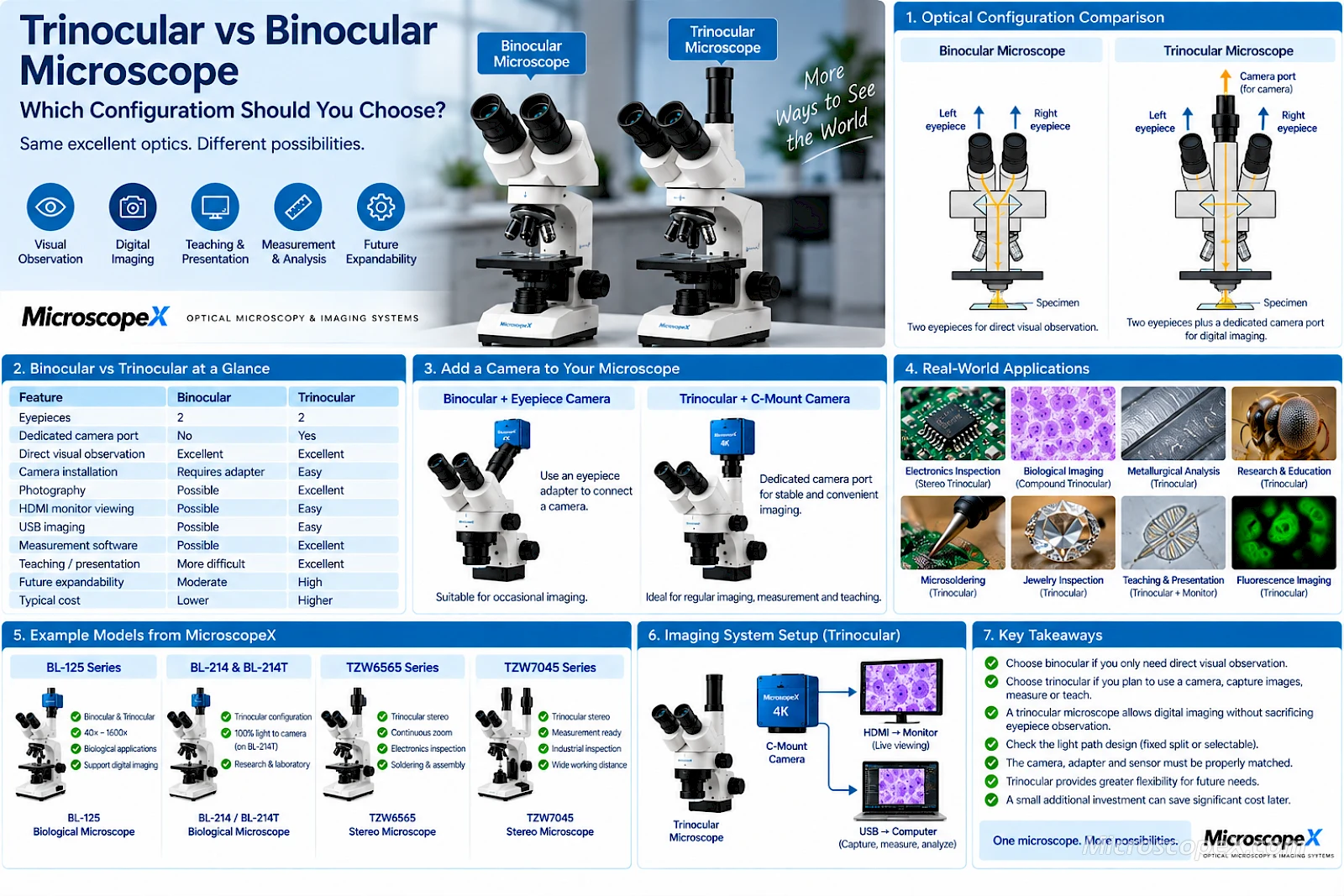
A binocular microscope has two eyepieces.
A trinocular microscope has two eyepieces plus a third optical port for a camera.
That description is correct, but it does not explain the most important practical differences.
The choice affects:
- Digital imaging
- Microscope photography
- Video recording
- HDMI monitor viewing
- Computer-based measurement
- Teaching
- Documentation
- Light distribution
- Future expandability
- Cost
If the microscope will only be used for direct visual observation, a binocular configuration may be all you need.
If there is any possibility that you will later add a microscope camera, record images, perform measurements, display specimens on a monitor or create a digital imaging workstation, a trinocular microscope usually provides much greater flexibility.
This guide explains how binocular and trinocular microscopes work, their advantages and limitations, and how to choose the right configuration for your application.
Explore:
What Is a Binocular Microscope?
A binocular microscope has two eyepiece tubes, allowing the user to observe the specimen with both eyes.
A typical optical arrangement is:
Specimen → Microscope Optics → Left Eyepiece + Right Eyepiece
Using both eyes generally provides more comfortable viewing than a monocular microscope, especially during extended observation.
Binocular heads are common on:
- Biological microscopes
- Stereo microscopes
- Metallurgical microscopes
- Polarizing microscopes
- Educational microscopes
- Laboratory microscopes
The main purpose of a binocular head is direct visual observation.
What Is a Trinocular Microscope?
A trinocular microscope normally provides:
- Two eyepiece tubes
- One additional camera or photography port
A typical arrangement becomes:
Specimen → Microscope Optics → Eyepieces + Camera Port
The third port can be connected to a digital imaging system such as:
- C-mount microscope camera
- HDMI camera
- USB camera
- USB3.0 camera
- Scientific camera
- Photography system
The camera can then display or record the microscope image.
Browse compatible C-Mount Cameras for digital imaging configurations.
Binocular vs Trinocular Microscope at a Glance
| Feature | Binocular | Trinocular |
|---|---|---|
| Eyepieces | 2 | 2 |
| Dedicated camera port | No | Yes |
| Direct visual observation | Excellent | Excellent |
| Camera installation | Requires eyepiece adapter or modification | Designed for camera integration |
| Photography | Possible, but less convenient | Excellent |
| HDMI monitor viewing | Possible with adapter | Easy |
| USB imaging | Possible with adapter | Easy |
| Measurement software | Possible | Excellent |
| Teaching / projection | More difficult | Excellent |
| Permanent camera setup | Less convenient | Excellent |
| Future expandability | Moderate | High |
| Typical cost | Lower | Higher |
The key difference is therefore not simply the number of tubes.
It is whether digital imaging is built into the microscope's optical design.
A Common Misunderstanding: Binocular Does Not Mean Stereo
The words binocular and stereo are sometimes confused.
They do not mean the same thing.
A binocular microscope simply allows observation with two eyes.
A stereo microscope uses two separate optical paths to provide stereoscopic depth perception.
A biological compound microscope can have a binocular head while still producing essentially the same specimen image for both eyes.
Therefore:
Binocular = two-eye viewing
while:
Stereo = stereoscopic optical imaging
A microscope can be:
- Binocular stereo
- Trinocular stereo
- Binocular compound
- Trinocular compound
These terms describe different aspects of the microscope.
The Main Advantage of a Trinocular Microscope
The biggest advantage is simple:
You can add a dedicated camera without sacrificing normal eyepiece observation.
A trinocular microscope allows you to build a digital imaging system such as:
Microscope
↓
Trinocular Camera Port
↓
↓
↓
Monitor or Computer
This is significantly more convenient than installing a camera into one of the eyepiece tubes.
Can You Add a Camera to a Binocular Microscope?
Yes.
A binocular microscope can often be converted for digital imaging.
A typical configuration is:
Eyepiece Tube → Camera Adapter → Camera
Common eyepiece-tube diameters include:
- 23.2 mm
- 30 mm
- 30.5 mm
MicroscopeX offers Microscope Eyepiece Converters for common microscope tube sizes.
This approach works well for:
- Occasional photography
- Education
- Existing microscopes
- Budget systems
However, it has several disadvantages compared with a dedicated trinocular configuration.
Limitations of Using a Camera Through an Eyepiece Tube
When a camera occupies an eyepiece tube:
- One eyepiece may need to be removed
- Camera alignment may be less convenient
- Switching between viewing and imaging can take more time
- The camera may be less mechanically stable
- Field-of-view matching may be more difficult
- Permanent installation is less elegant
For occasional imaging, this may be completely acceptable.
For regular professional imaging, trinocular is generally preferable.
How Does a Trinocular Light Path Work?
This is where trinocular microscopes become more interesting.
Adding a third port does not create additional light.
The microscope must distribute the available light between:
- Eyepieces
- Camera port
Different microscope heads use different light-path designs.
Fixed Beam Split
Some trinocular microscopes divide light continuously between the eyepieces and camera.
For example, a hypothetical system might send:
50% to eyepieces
and:
50% to camera
Another design may use a different split.
The advantage is that both observation and imaging can occur simultaneously.
The disadvantage is that neither optical path receives all available light.
Selectable Light Path
Some trinocular microscopes include a selector that redirects light.
Possible modes may include:
100% eyepieces / 0% camera
or:
0% eyepieces / 100% camera
or various intermediate ratios.
This can be particularly useful for low-light imaging.
For example, the BL-214 & BL-214T includes a trinocular configuration designed to send 100% light flux to the photography path when required.
This is useful when camera sensitivity matters more than simultaneous eyepiece observation.
Why Light Distribution Matters
For bright specimens, the difference may be barely noticeable.
For low-light applications, every photon matters.
Examples include:
- Fluorescence microscopy
- Darkfield
- Low-intensity biological imaging
- High-speed camera imaging
- Long-exposure scientific photography
Sending more light to the camera can improve:
- Exposure time
- Signal level
- Image brightness
- Signal-to-noise performance
This is why professional trinocular microscopes may include a light-path selector.
Do All Trinocular Microscopes Work the Same Way?
No.
This is an important buying consideration.
Different trinocular microscopes may use:
- Fixed beam split
- Mechanical light-path selector
- Simultaneous viewing
- 100% camera output
- 100% eyepiece output
- Different optical ratios
Before purchasing, check the actual specification.
Do not assume that every trinocular microscope provides simultaneous eyepiece and camera viewing.
Trinocular Does Not Automatically Include a Camera
Another common misconception is:
“If it is trinocular, the camera is included.”
Not necessarily.
Trinocular describes the microscope head configuration.
The actual imaging system may still require:
- Camera
- C-mount adapter
- Appropriate sensor
- HDMI or USB cable
- Monitor or computer
- Imaging software
Some microscope packages include these components.
Others provide only the trinocular microscope.
What Is the Third Tube Used For?
The third tube is commonly called:
- Camera port
- Photo port
- Photography tube
- Trinocular port
It provides an optical path for image capture.
Depending on the microscope, the port may connect to:
- C-mount adapter
- DSLR adapter
- Mirrorless camera adapter
- Scientific camera
- Specialized imaging system
For most modern digital microscopy, C-mount cameras are especially common.
What Is a C-Mount Adapter?
A C-mount adapter connects the trinocular photo port to a compatible microscope camera.
It can affect:
- Camera field of view
- Image magnification
- Sensor coverage
- Parfocality
- Vignetting
Common adapter factors include:
- 0.35×
- 0.5×
- 0.63×
- 0.75×
- 1×
The correct adapter depends on the camera sensor and microscope.
A trinocular port alone does not guarantee perfect camera compatibility.
The complete optical system still needs to be matched.
Why Sensor Size Matters on a Trinocular Microscope
The camera sensor captures only part of the image delivered through the trinocular port.
A smaller sensor generally captures a narrower field.
A larger sensor generally captures a wider field, assuming the microscope and adapter provide sufficient optical coverage.
This means two cameras connected to the same trinocular microscope can produce very different fields of view.
Camera selection should consider:
- Sensor size
- Pixel size
- Resolution
- Adapter magnification
- Image circle
Browse Microscope Cameras for different sensor and interface configurations.
Binocular vs Trinocular for Biological Microscopy
For routine visual biological observation, a binocular microscope may be entirely sufficient.
Applications include:
- Classroom slide observation
- Routine laboratory work
- Basic microbiology
- General biological observation
If the microscope will also be used for:
- Image capture
- Histology documentation
- Teaching
- Measurement
- Research records
- Digital archiving
a trinocular configuration becomes much more useful.
Example: Biological Microscope with Both Options
Some microscope families are available in both binocular and trinocular configurations.
For example, the BL-125 Series is available in binocular and trinocular versions and supports biological laboratory applications across a 40×–1600× magnification range.
This allows the same basic microscope platform to be selected according to whether digital imaging is required.
Binocular for Routine Observation
A binocular biological microscope is a logical choice when:
- The microscope will only be viewed through the eyepieces
- No permanent camera is required
- Budget is important
- Digital documentation is rare
- Simplicity is preferred
There is little benefit in paying for a camera port that will never be used.
Trinocular for Laboratory Documentation
Choose trinocular when you need to:
- Record specimens
- Create laboratory reports
- Compare samples
- Measure structures
- Share images
- Archive results
- Use image-analysis software
For modern digital laboratories, these capabilities can justify the additional cost very quickly.
Binocular vs Trinocular for Stereo Microscopy
The same choice appears with stereo microscopes.
A stereo microscope is frequently used for:
- PCB inspection
- Electronics
- Microsoldering
- Jewelry
- Watch repair
- Mechanical inspection
- Entomology
- Dissection
For direct manual work, binocular stereo viewing provides excellent three-dimensional perception.
But adding a trinocular camera port greatly expands the system.
Trinocular Stereo Microscope for Electronics
A trinocular stereo microscope allows a camera to be connected while the operator continues using the eyepieces.
This is useful for:
- PCB documentation
- Microsoldering videos
- Quality-control records
- Training
- Customer demonstrations
- Measurement
- Large-screen inspection
The TZW6565 Series provides a trinocular stereo configuration with continuous zoom and multiple stand options for applications including electronics inspection and soldering.
Trinocular Stereo Microscope for Measurement
For industrial inspection and measurement, a trinocular head can be particularly useful.
A camera can send the image to a computer for:
- Calibration
- Distance measurement
- Diameter measurement
- Area measurement
- Annotation
- Documentation
The TZW7045 Series combines a trinocular head with continuous zoom for inspection and measurement applications.
Is a Trinocular Microscope Better for Microsoldering?
Not necessarily for the actual optical viewing experience.
If you work entirely through the eyepieces, a good binocular stereo microscope can perform extremely well.
The advantage of trinocular is expandability.
It allows you to add a camera for:
- 4K inspection
- Recording
- Training
- Customer reports
- Large-screen viewing
For a professional repair workstation, this flexibility is often worth having.
Eyepieces vs Monitor for Microsoldering
A trinocular microscope gives you both options.
Eyepieces
Advantages:
- True stereo depth perception
- Immediate optical response
- Excellent hand-eye coordination
- No digital latency
Monitor
Advantages:
- Larger image
- More ergonomic head position in some workstations
- Easy recording
- Easy sharing
- Excellent for inspection
A professional trinocular stereo setup can provide:
Eyepieces for precise manipulation
and:
Camera for inspection and documentation
HDMI Camera on a Trinocular Microscope
An HDMI camera allows the microscope image to be displayed directly on a monitor.
Typical configuration:
Trinocular Microscope → C-Mount Adapter → HDMI Camera → Monitor
Advantages include:
- No computer required
- Large-screen viewing
- Low-latency operation
- Easy teaching
- Easy inspection
This is particularly useful for:
- Electronics
- PCB inspection
- Jewelry
- Industrial inspection
- Demonstration
USB Camera on a Trinocular Microscope
A USB camera connects the trinocular microscope to a computer.
Typical configuration:
Trinocular Microscope → Adapter → USB Camera → Computer
This enables:
- Image capture
- Video
- Measurement
- Analysis
- Reporting
- Archiving
For higher data rates, USB3.0 is particularly useful.
See the U3CMOS USB3.0 Camera Series for a computer-based C-mount imaging platform.
HDMI + USB on a Trinocular Microscope
For many professional applications, this is one of the most versatile configurations.
You can use:
HDMI → Monitor
for direct live inspection.
And:
USB → Computer
for:
- Measurement
- Capture
- Documentation
- Analysis
This converts the microscope into a complete digital imaging workstation.
Trinocular Microscopes for Teaching
Teaching is one of the strongest arguments for a trinocular microscope.
Instead of one student looking through the eyepieces, the camera image can be displayed on:
- Monitor
- Projector
- Interactive display
- Computer
This allows an entire class to see the same specimen.
A teacher can point out:
- Cell structures
- Microorganisms
- Tissue features
- Material defects
- Insect anatomy
The microscope becomes a shared visual tool rather than an individual instrument.
Trinocular Microscopes for Photography
A trinocular microscope provides a dedicated optical path for photography.
Possible uses include:
- Scientific publications
- Laboratory reports
- Product inspection
- Failure analysis
- Teaching materials
- Technical documentation
- Marketing images
The dedicated camera port makes it easier to leave the imaging system installed and calibrated.
Trinocular Microscopes for Video Recording
Video can be useful for:
- Dynamic biological specimens
- Microsoldering procedures
- Training
- Production inspection
- Educational demonstrations
- Experimental records
Depending on the application, choose a camera based on:
- Resolution
- FPS
- Latency
- Sensor size
- Interface
A trinocular microscope provides the optical foundation for these workflows.
Trinocular Microscopes for Measurement
Digital measurement can be performed when the trinocular microscope is combined with:
- Calibrated camera
- Appropriate adapter
- Measurement software
- Calibration slide
Possible measurements include:
- Distance
- Diameter
- Radius
- Angle
- Area
- Perimeter
This is useful for:
- Industrial inspection
- Metallurgy
- Electronics
- Materials science
- Biological measurement
Trinocular Microscopes for Metallurgy
Metallurgical microscopy often requires documentation and quantitative analysis.
A trinocular configuration allows a camera to record:
- Grain structures
- Coatings
- Surface defects
- Semiconductor features
- Polished materials
- Material interfaces
Some advanced systems can direct the full optical output toward the camera when imaging is the priority.
For example, the VM2000I Series includes a trinocular inverted metallurgical configuration with a photography light path.
Trinocular Microscopes for Fluorescence
Fluorescence microscopy is another application where a dedicated camera port is highly valuable.
Fluorescence signals can be weak.
Imaging may require:
- Sensitive sensor
- Long exposure
- Low read noise
- Cooling
- High quantum efficiency
Being able to direct a large proportion—or in some systems all—of the available imaging light toward the camera can be important.
For fluorescence work, always check the microscope's actual light-path configuration.
Does a Trinocular Microscope Reduce Image Brightness?
It depends on the optical design and selected mode.
If the microscope permanently divides light between the eyepieces and camera, each path receives only part of the available light.
If the microscope has a selector that sends 100% of the light to one path, that selected path can receive essentially all of the available imaging light.
Therefore, the correct answer is:
Sometimes—but not necessarily.
Always check the beam-split specification.
Does the Camera Affect What You See Through the Eyepieces?
Normally, the camera itself does not change eyepiece magnification or resolution.
However, the microscope's light-path configuration can influence brightness.
For example:
- 100% eyepiece mode → maximum visual brightness
- Split mode → some light goes to the camera
- 100% camera mode → eyepieces may become dark
This behavior is determined by the microscope head.
Are Binocular Microscopes More Comfortable?
Not inherently.
Both binocular and trinocular microscopes normally provide two eyepieces for direct observation.
Viewing comfort depends more on:
- Eyepiece angle
- Eye relief
- Interpupillary adjustment
- Diopter adjustment
- Microscope height
- Ergonomics
A trinocular head should not be assumed to be less comfortable simply because it includes an additional camera port.
Is Trinocular Image Quality Better?
Not automatically.
A trinocular microscope does not inherently provide higher optical resolution than an equivalent binocular model.
If both use the same:
- Objectives
- Optical system
- Eyepieces
- Illumination
their direct viewing quality may be essentially the same.
The advantage of trinocular is primarily:
digital imaging capability and expandability
rather than inherently better optics.
Does Trinocular Mean More Magnification?
No.
Trinocular describes the head configuration.
Magnification is determined by components such as:
- Objective
- Zoom optics
- Eyepieces
- Auxiliary lenses
A trinocular microscope does not automatically magnify more than a binocular microscope.
Is Trinocular Worth the Extra Cost?
The answer depends on how long you expect to own the microscope and whether your workflow may evolve.
Choose binocular if you are confident that you only need direct observation.
Choose trinocular if you may later want:
- Photography
- Video
- HDMI output
- USB imaging
- Measurement
- Teaching
- Remote viewing
- Documentation
Adding camera capability later can be much easier if the microscope was trinocular from the beginning.
Think About Future Requirements
A microscope may remain in service for many years.
Your current requirement may be simple observation.
Later, you may need:
- Customer reports
- Digital records
- Quality documentation
- Training videos
- Measurements
- Computer analysis
Replacing an entire microscope simply to gain a camera port can be more expensive than choosing trinocular initially.
This makes trinocular especially attractive for:
- Professional laboratories
- Businesses
- Universities
- Industrial QC
- Repair centers
When a Binocular Microscope Is the Better Choice
Choose binocular when:
- The microscope will only be used for visual observation
- No camera is required
- Budget is limited
- Simplicity matters
- The microscope is used occasionally
- Portability matters
Examples include:
- Basic school microscope
- Hobby microscope
- Simple repair station
- Routine manual inspection
In these cases, trinocular may add unnecessary cost and complexity.
When a Trinocular Microscope Is the Better Choice
Choose trinocular when:
- You need photography
- You need video
- You need a 4K monitor
- You need USB imaging
- You perform measurements
- You need documentation
- You teach groups
- You perform quality control
- You may add a camera later
For professional applications, trinocular is often the safer long-term choice.
Recommended Configuration: Electronics Repair
A good professional electronics workstation might include:
- Trinocular stereo microscope
- Continuous zoom
- Long working distance
- Boom stand
- LED ring light
- C-mount adapter
- HDMI + USB camera
- Large monitor
Use:
Eyepieces → precision soldering
HDMI → large-screen inspection
USB → documentation and measurement
Recommended Configuration: Biological Laboratory
A biological imaging system might include:
- Trinocular compound microscope
- Plan objectives
- C-mount adapter
- USB3.0 color camera
- Computer
- Imaging software
- Calibration slide
This provides:
- Direct observation
- Image capture
- Measurement
- Documentation
- Teaching
For examples of microscopes available with both binocular and trinocular configurations, see:
Recommended Configuration: Industrial Inspection
For industrial inspection:
- Trinocular stereo or metallurgical microscope
- Stable stand
- Appropriate illumination
- USB3.0 camera
- Measurement software
- Calibration reference
A trinocular head allows the optical system to become part of a digital quality-control workflow.
Recommended Configuration: Teaching
For classroom use:
- Trinocular microscope
- HDMI camera
- Large monitor or projector
Optional:
- USB connection
- Image capture software
- Measurement tools
The instructor can continue using the eyepieces while the class follows the specimen on the display, depending on the microscope's light-path configuration.
Binocular vs Trinocular Buying Checklist
Before ordering a microscope, ask the following questions.
1. Will I ever need to capture images?
Yes → Trinocular
2. Will I need video recording?
Yes → Trinocular
3. Do I want to use a large monitor?
Yes → Trinocular recommended
4. Will I perform computer-based measurement?
Yes → Trinocular
5. Is the microscope only for direct observation?
Yes → Binocular may be sufficient
6. Do I need the lowest possible price?
Yes → Binocular usually costs less
7. Will multiple people need to view the specimen?
Yes → Trinocular + camera
8. Could my imaging requirements expand later?
Yes → Trinocular
Common Buying Mistakes
Mistake 1: Thinking Trinocular Means Three Eyepieces
Usually it does not.
The third port is normally designed for a camera.
Mistake 2: Thinking Binocular Means Stereo
Binocular describes two-eye observation.
Stereo describes stereoscopic depth perception.
Mistake 3: Assuming Every Trinocular Microscope Can Show Eyepiece and Camera Images Simultaneously
Light-path designs differ.
Check the beam-split specification.
Mistake 4: Assuming the Camera Is Included
A trinocular microscope may still require a separate:
- Camera
- Adapter
- Cable
- Software
Mistake 5: Ignoring the C-Mount Adapter
The adapter must match:
- Microscope
- Camera sensor
- Desired field of view
Mistake 6: Buying Binocular and Assuming a Camera Will Be Easy to Add Later
It may be possible, but a dedicated trinocular port is usually more convenient.
Mistake 7: Assuming Trinocular Has Better Optical Resolution
The camera port itself does not increase microscope resolution.
Mistake 8: Ignoring Future Requirements
A small additional investment in trinocular configuration can provide much greater expansion capability over the microscope's lifetime.
Binocular vs Trinocular: Application Guide
| Application | Binocular | Trinocular | Recommended |
|---|---|---|---|
| Basic visual observation | Excellent | Excellent | Binocular |
| Hobby microscopy | Excellent | Excellent | Binocular |
| School individual use | Excellent | Excellent | Binocular |
| Classroom presentation | Limited | Excellent | Trinocular |
| PCB inspection | Excellent | Excellent | Depends |
| Professional microsoldering | Excellent | Excellent | Trinocular |
| Biological documentation | Limited | Excellent | Trinocular |
| Research imaging | Limited | Excellent | Trinocular |
| Industrial measurement | Limited | Excellent | Trinocular |
| Photography | Possible | Excellent | Trinocular |
| Video recording | Possible | Excellent | Trinocular |
| Quality control | Good | Excellent | Trinocular |
| Fluorescence imaging | Limited | Excellent | Trinocular |
Frequently Asked Questions
What is the difference between binocular and trinocular microscopes?
A binocular microscope provides two eyepieces for direct observation.
A trinocular microscope provides two eyepieces plus a dedicated camera or photography port.
Is trinocular better than binocular?
Not automatically.
For direct visual observation, both can provide excellent performance.
Trinocular is better when digital imaging, photography, measurement or video is required.
Can I use a camera with a binocular microscope?
Usually yes.
A camera can often be installed through an eyepiece tube using a suitable adapter.
However, a trinocular microscope provides a more convenient permanent camera connection.
Can I look through the eyepieces while using the camera?
It depends on the microscope's light-path design.
Some trinocular heads provide simultaneous viewing.
Others use a selector to send light either to the eyepieces or camera.
Always check the specific microscope.
Does a trinocular microscope have three eyepieces?
Normally no.
Two ports are used for eyepieces.
The third is typically used for a camera.
Does a trinocular microscope provide better image quality?
Not necessarily.
If the binocular and trinocular versions use the same optical system, their direct optical image quality can be essentially identical.
The trinocular version adds digital-imaging capability.
Does a trinocular microscope reduce brightness?
A fixed beam splitter can reduce the light available to each path.
Selectable systems may instead direct most or all available light to either the eyepieces or camera.
Is trinocular worth it for PCB repair?
If you only work through the eyepieces, binocular can be sufficient.
If you want:
- Camera recording
- 4K monitor viewing
- Training
- Documentation
- Measurement
trinocular is usually worth choosing.
Is trinocular worth it for biological microscopy?
For laboratories, teaching and research, often yes.
Digital imaging is increasingly useful for documentation, measurement and collaboration.
What camera can I use with a trinocular microscope?
Depending on the microscope and adapter, options may include:
- HDMI camera
- USB camera
- USB3.0 camera
- C-mount camera
- Scientific camera
Browse:
Do I need a C-mount adapter?
Usually, if the camera has a C-mount interface and the microscope photo port is not already directly compatible.
The adapter also helps match the camera sensor to the microscope image.
Conclusion
The difference between binocular and trinocular microscopes is not primarily about optical quality.
It is about how the microscope will be used.
Choose a binocular microscope when you need:
- Direct visual observation
- Simplicity
- Lower cost
- No permanent camera
Choose a trinocular microscope when you need:
- Photography
- Video recording
- HDMI monitor viewing
- USB imaging
- Measurement
- Documentation
- Teaching
- Research imaging
- Future camera expansion
For many professional applications, trinocular provides the best long-term flexibility.
A trinocular microscope allows you to combine:
Direct optical observation + digital imaging
without forcing you to choose between the two.
The most important factor is not simply whether the microscope has a third port.
It is whether the complete system is correctly matched:
Microscope + light path + camera port + adapter + sensor + interface + software
When these elements are properly configured, a trinocular microscope becomes the foundation of a powerful digital imaging workstation.
Explore Binocular and Trinocular Microscope Systems
Stereo Microscopy
- Stereo Microscopes
- TZW6565 Trinocular Stereo Microscope Series
- TZW7045 Trinocular Measurement & Inspection Series
Compound Microscopy
- Compound Microscopes
- BL-125 Binocular / Trinocular Biological Microscope
- BL-214 & BL-214T Biological Microscope
- VM2000I Trinocular Metallurgical Microscope
Digital Imaging
Need help deciding between a binocular or trinocular configuration?
Contact MicroscopeX for complete microscope and digital imaging system configuration support.